We have been catching up and will continue today.
I will be checking blogs for completion.
ALL assignments must be updated by TOMORROW (Tuesday)
I will miss you all :)
Monday, June 20, 2011

Monday, June 6, 2011
Photo of the week: EMOTION
The photo of the week this week is EMOTION.
We will spend this week and next simply on catch up. We will omit the last HDR from the list just so everyone can catch up. Grads will be away Thurs and Friday for some of the class. Please make sure you CHECK YOUR BLOG and the list on the chalk board.
EMOTION


We will spend this week and next simply on catch up. We will omit the last HDR from the list just so everyone can catch up. Grads will be away Thurs and Friday for some of the class. Please make sure you CHECK YOUR BLOG and the list on the chalk board.
EMOTION

Monday, May 30, 2011
Photo of the week: EXTREME LIGHT
Good morning, only 15 more classes, reminder to GET YOUR WORK POSTED!!!!
Please remember to post your PORTRAITS and movement images this week. Next week we will be looking at HDR photography.


Please remember to post your PORTRAITS and movement images this week. Next week we will be looking at HDR photography.
Friday, May 27, 2011
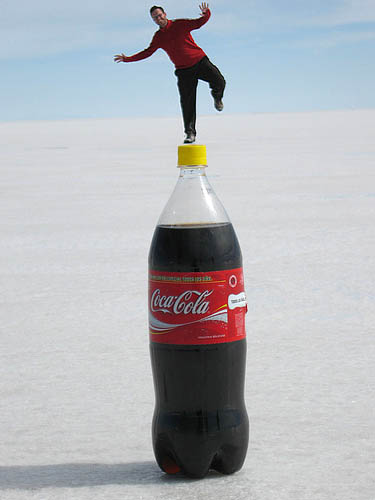

Thursday, May 26, 2011
Wow, Thursday already!
Yesterday I handed out slips that listed what you are missing. It is VERY important that you keep up to date and continue to post your photography. I have a camera available with camera functions for changing shutter speed. You will need this in order to capture some blurred movement for the 'movement' assignment.
Here are some tips:
Here are some tips:


Wednesday, May 25, 2011
Good afternoon
I have a print out for you regarding ALL missing assigments and any future assignemnts. This will help you keep organized for the following few weeks :)
Pls help conserve by keeping your printout in a safe place.


Pls help conserve by keeping your printout in a safe place.
Tuesday, May 24, 2011
Happy Tuesday
I hope everyone had a great Long Weekend! Now, we are quickly approaching the end of term. We have 13 school days until Grad and 18 days until the term ends. Literally, we have 24 days until we head into the weekend before exams.
Please keep in mind the assignments that are due. This week we will be working on MOVEMENT>
and next week HDR then we will be assembling photos into a slideshow and printing for the Fine Arts Showcase.
Here is a photographer that hosts a website with many beautiful images. The Ocean inspires him
http://www.wix.com/retromovement/dancosta#!portfolio DAN COSTA: Living the Dream
MOVEMENT
Movement in photography is most times something that you want to avoid. Other times, however, movement can be the subject of the photograph, and can provide some very interesting effects, for example a blurred background and a completely still foreground. This weeks focus is: Movement.
http://gadgetphotoreview.com/camera-shutter-speed-is-limited-movement-photography/.html
We can look at movement in different ways: Frozen action, subject in focus-movement around subject. Action Photography
http://www.cruzine.com/2010/08/09/action-photography/ <---Frozen action
Using BLUR to portray Movement
 Shutter speed: 8 seconds

Please keep in mind the assignments that are due. This week we will be working on MOVEMENT>
and next week HDR then we will be assembling photos into a slideshow and printing for the Fine Arts Showcase.
Here is a photographer that hosts a website with many beautiful images. The Ocean inspires him
http://www.wix.com/retromovement/dancosta#!portfolio DAN COSTA: Living the Dream
MOVEMENT
Movement in photography is most times something that you want to avoid. Other times, however, movement can be the subject of the photograph, and can provide some very interesting effects, for example a blurred background and a completely still foreground. This weeks focus is: Movement.
http://gadgetphotoreview.com/camera-shutter-speed-is-limited-movement-photography/.html
We can look at movement in different ways: Frozen action, subject in focus-movement around subject. Action Photography
http://www.cruzine.com/2010/08/09/action-photography/ <---Frozen action
Using BLUR to portray Movement



Monday, May 16, 2011
Good Morning
Cell Phone Photography

http://www.flickr.com/groups/73532194@N00/
http://www.digital-photography-school.com/how-to-use-a-camera-phone
Following are 13 tips for Camera Phone owners to help them get the most from their cameras phones:
- Light Your Subject Well
- Get close to your subject
- Keep Still
- Edit Images Later
- Dont Throw Away Mistakes
- Avoid Using Digital Zoom
-Take Lots of Shots and Experiment
- Keep Your Lens Clean
- Observe Camera Phone Etiquette
- Use the HIghest Resolution Available
Because of our recent 'LOSS' we will be using cell phones to take the photos of the week and I have three available cameras for the main assignments.
Read more: http://www.digital-photography-school.com/how-to-use-a-camera-phone#ixzz1MZsd8PhX

http://www.flickr.com/groups/73532194@N00/
http://www.digital-photography-school.com/how-to-use-a-camera-phone
Following are 13 tips for Camera Phone owners to help them get the most from their cameras phones:
- Light Your Subject Well
- Get close to your subject
- Keep Still
- Edit Images Later
- Dont Throw Away Mistakes
- Avoid Using Digital Zoom
-Take Lots of Shots and Experiment
- Keep Your Lens Clean
- Observe Camera Phone Etiquette
- Use the HIghest Resolution Available
Because of our recent 'LOSS' we will be using cell phones to take the photos of the week and I have three available cameras for the main assignments.
Read more: http://www.digital-photography-school.com/how-to-use-a-camera-phone#ixzz1MZsd8PhX
Good Morning
The photo of the week this week is:
EMPTY ROOM
Alternative Art Festival is approaching QUICKLY!
Please be sure to fill out a form and get a permission slip, print your work, put on black paper and create your lables. Some of your work is absolutely amazing!! Pls be sure to enter with a chance to win up to $200
Please remember to post EVERY week, keep up with regular assignments and do your BEST work!!
Portraiture and Lighting
http://www.professionalphotography101.com/portrait_lighting/lighting_names.html
http://www.portraitlighting.net/One_Light_Examples.htm
http://www.petapixel.com/2011/04/15/three-studio-portrait-lighting-techniques-with-a-single-light/
EMPTY ROOM
Alternative Art Festival is approaching QUICKLY!
Please be sure to fill out a form and get a permission slip, print your work, put on black paper and create your lables. Some of your work is absolutely amazing!! Pls be sure to enter with a chance to win up to $200
Please remember to post EVERY week, keep up with regular assignments and do your BEST work!!
Portraiture and Lighting
http://www.professionalphotography101.com/portrait_lighting/lighting_names.html
http://www.portraitlighting.net/One_Light_Examples.htm
http://www.petapixel.com/2011/04/15/three-studio-portrait-lighting-techniques-with-a-single-light/
Wednesday, May 11, 2011
Good afternoon
Please check your blogs and update as AT RISK interims come out next week (Monday)
 Portraiture continued.....
 Portraiture continued.....
Tuesday, May 10, 2011
Choosing a theme for your portraiture unit
http://www.flickr.com/groups/fineportraiture/
Theme ideas:
-everything green
-self portrait
-film still portraiture
-black and white
-in the garden
-reflection
-me,myself and I (posed portraits with more than one of you)
-'they look like dolls'
-clown portraits
-polaroid portraits
-haunted portraits
-western images
-sepia
-child poses
-everything has a hat
-moms
-costumes that are somehow related
-playing with double images
-High Key
-After Warhol


Theme ideas:
-everything green
-self portrait
-film still portraiture
-black and white
-in the garden
-reflection
-me,myself and I (posed portraits with more than one of you)
-'they look like dolls'
-clown portraits
-polaroid portraits
-haunted portraits
-western images
-sepia
-child poses
-everything has a hat
-moms
-costumes that are somehow related
-playing with double images
-High Key
-After Warhol
Sunday, May 8, 2011
Good morning
Hi everyone! I am away this morning BUT I will be back tomorrow :)
Please make sure you update your blogs and check for comments (unless you have not posted anything new lately)
GRADE 11s
Black and white--should be posted
Abstract --should be posted
Portraiture *starting this week. REMEMBER* think of a theme for your portraits.
GRADE 12s (working on portfolios)
should have conquered many of the sections (4-5 out of the six would be good)
Check if you have added all of the photos of the week:
Week one: March 1-4 ONE OF THESE THINGS IS NOT LIKE THE OTHER
Week two: March 7-11 POST BY MARCH 11 STRANGE AND PECULIAR
Week three: March 14-18 HANDS
After Spring Break
April 4-8 CLOSE-UP
April 11-15- Water
April 18-21- Secret Passage
April 26-30 - The sun http://www.learningtoloveyoumore.com/reports/27/27.php
May 2-6- DANCE
May 9-12- Burst of Colour
May 16-20- Empty Room
May 24-27- Garbage
May 30-June 3- Extreme Light
June 6-10- Emotion
June 13-17- CATCH UP: no photo of the week
THIS WEEK BURST OF COLOUR. Please post by THURSDAY as FRIDAY is a Pro-D day :)


 These are just some images to show you many different ways people take portraits.
Please make sure you update your blogs and check for comments (unless you have not posted anything new lately)
GRADE 11s
Black and white--should be posted
Abstract --should be posted
Portraiture *starting this week. REMEMBER* think of a theme for your portraits.
GRADE 12s (working on portfolios)
should have conquered many of the sections (4-5 out of the six would be good)
Check if you have added all of the photos of the week:
Week one: March 1-4 ONE OF THESE THINGS IS NOT LIKE THE OTHER
Week two: March 7-11 POST BY MARCH 11 STRANGE AND PECULIAR
Week three: March 14-18 HANDS
After Spring Break
April 4-8 CLOSE-UP
April 11-15- Water
April 18-21- Secret Passage
April 26-30 - The sun http://www.learningtoloveyoumore.com/reports/27/27.php
May 2-6- DANCE
May 9-12- Burst of Colour
May 16-20- Empty Room
May 24-27- Garbage
May 30-June 3- Extreme Light
June 6-10- Emotion
June 13-17- CATCH UP: no photo of the week
THIS WEEK BURST OF COLOUR. Please post by THURSDAY as FRIDAY is a Pro-D day :)
 These are just some images to show you many different ways people take portraits.
Friday, May 6, 2011
Good afternoon
Today is the last day to post your DANCE photo. Grade 11 should have:
Black and white images
Abstract images
and be working on portraiture
Grade 12 should have:
3 sections of portfolio (from last semester) PLUS faceless images
you should have completed AT LEAST 1-2 sections for this term because you need 6 sections
Young photographers
http://www.nonsensesociety.com/2010/05/10-young-photographers/ we will look at some of the work from Artist/photographers from all around the world.


Black and white images
Abstract images
and be working on portraiture
Grade 12 should have:
3 sections of portfolio (from last semester) PLUS faceless images
you should have completed AT LEAST 1-2 sections for this term because you need 6 sections
Young photographers
http://www.nonsensesociety.com/2010/05/10-young-photographers/ we will look at some of the work from Artist/photographers from all around the world.
Wednesday, May 4, 2011
 ATTENTION PHOTO 12- Consider your landscape images and look at the work of
 Mark Suarez. He places his landscape images into a circle shape. See Below
Mark Suarez is an artist and graphic/web designer. He is married and lives in Greenwood SC.
He has been an artist since the age of three and is also a musician.


How to????
Open Photoshop


 |
| press in between both layers and hit ALT and click with the mouse. You will then CUT OUT your image. |
Subscribe to:
Posts (Atom)